Working with Functions
- JavaScript Code Conventions - There are many widely accepted standards for writing clean JavaScript code. The one linked here is Google's suggested guide. The important thing is that you choose a standard and stick with it!
- JSHint - JSHint can be used to 'lint' your code, which basically means that it will help you locate any hard to find errors and style no-nos that you may have in your code.
- jsFiddle - jsFiddle allows you to test out your ideas (and share them!) without having to go through the usual process of edit-save-refresh. Just enter your desired HTML, CSS, and JS and away you go!
- Chrome Developer Tools - The console is a great tool for learning JavaScript. It allows us direct access to the JavaScript event loop so that we may execute statements in real time!
Functions (Introduction)
To follow along with this exercise, you will need to download and un-zip this starter kit.
Functions are (at their simplest form) collections of statements that may be run as a group at a later time. These can be useful as they allow developers to reuse code and break larger problems down into simpler ones.
As an example, from our previous exercise, we could create a function that could update the innerHTML of the first element that matches a selector. This can be done by declaring a function that accepts two parameters, which represent incoming values that the function needs to operate properly. These two parameters will represent the selector for the element to update and the new innerHTML value to use.
The sample function declaration below will be used to explore this concept further:
Example 1. Sample function to update the innerHTML of a matched element
function updateInnerHTML(selector, newValue) {
  document.querySelector(selector).innerHTML = newValue;
}
Function Declaration Breakdown
Function Signature
The first line in the example above is known as the function signature; it informs us of how to use the function. The reserved word function is used to indicate that we are declaring a new function. Following the reserved word we see updateInnerHTML, which is the name of the function. The name of the function is important as it’s used to invoke or call the function at a later time. Following the name we find the parameter list enclosed within parentheses. You can specify as many parameters as are necessary (including none) for the function to operate correctly. These parameters represent the actual passed in argument values upon being properly called.
Function Body
Note that the body (enclosed within braces) is not executed at the time the browser sees the declaration. The body of the function is what’s known as a block-statement, which is simply any group of statements that are enclosed within braces. This block of code is effectively executed as a whole. In this case, the body is only made up of a single statement, which simply attempts to assign a new value to an existing element’s innerHTML property.
Calling a Function
To actually use the function, it must be called or invoked. This is simply done by referencing the name of the function followed by any required arguments (the parentheses are necessary, even if there are no arguments). For example, using our function from Example 1 to update the innerHTML of the first h1 on a page would look like the following:
Example 2. Calling a function
updateInnerHTML('h1', 'updated text');
The first argument (‘h1’) represents the selector for the element we wish to update, and the second
argument (‘updated text’) represents the new value for the innerHTML. These values are passed in
order to the corresponding parameters (i.e. selector and newValue) in the function declaration. These
actual values are then subbed-in for the parameters where they appear in the function body. Let’s give
it a try.
Exercise Steps
- Open your Chrome web browser
- Open the accompanying HTML document (functions_exercise.html) in the browser (drag and drop)
- Open the console
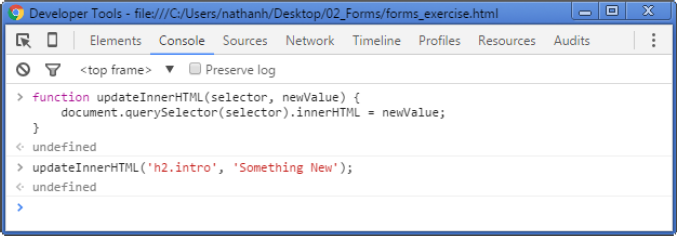
- Copy the function from the example above into the console and press
- This is will declare the function for use
- Now, use the function to update the innerHTML of the h2.intro element to whatever you like
- Refresh the page once you are done to return to the original text
Figure 1. Sample output from the above steps
Returning a Value
Our first function is very simple and doesn’t do a whole lot, which is fine in this case. Many useful
functions are quite simple and easy to use. One of the most common reasons to declare a function is to
have it perform some calculation or return some result. This can be done by including a return
statement in your function body. The return statement is simply a statement that begins with the
reserved word return followed by an expression or a value. Let’s explore functions that return a value
by creating another simple example.
The following function will simply return a string that is enclosed within strong tags.
Example 3. A function that returns a value
function strong(value) {
  return '<strong>' + value + '</strong>';
}
This example introduces not only the idea of the return statement but also concatenation. Concatenation is simply the joining of two strings to form a new string (think of adding two strings together). In this case, the concatenation operator (+) is used to join the string literal ‘<strong>’ to the passed in parameter value forming a new string. This resultant string is then concatenated again with the trailing ‘</strong>’ string literal to form yet another new string, which is then returned by the function (Note: A function may only return a single value).
The final result of the concatenation operations is then returned to where the function was originally called. For example, calling the function from within the console will simply have the result returned to the global scope and we should see the result displayed.
This means that we can use the function call anywhere we would expect to use the returned value (note: there are many built-in functions in JavaScript and we will be introduced to only a fraction of what’s available in this course).
As a final example, we will use this newly declared function to update the innerHTML of the p.important paragraph.
Exercise Steps
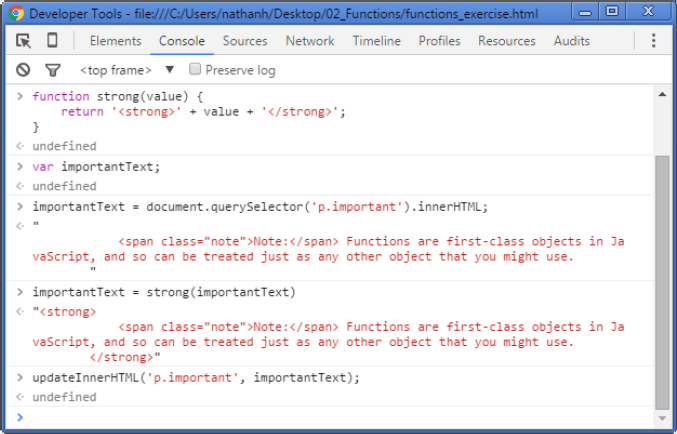
- Declare the strong function in the console
- Declare a variable to hold the current innerHTML value from p.important (name this variable appropriately)
- Assign this variable the strong string value by using the strong function and passing in this same variable in as the argument
- Finally, update the p.important innerHTML using the updateInnerHTML function
Figure 2. Sample output from the above steps
As you can see, functions can prove to be powerful tools when building up web applications.