AJAX
Asynchronous JavaScript and XML (AJAX)
To follow along with this exercise, you will need to download and un-zip this starter kit.
AJAX has been around for quite some time and has really only recently begun to grab the attention of mainstream developers. Quite simply, AJAX provides a means of sending HTTP requests to an HTTP server asynchronously. What does that mean?
Typical HTTP requests sent by the browser are what we call synchronous in that while the request is being fetched, the browser blocks and waits for the response which is then reloaded in the browser. This behaviour is typical of what one would expect when surfing the web. For example, clicking a link to another document requires that the HTTP request be sent out to the server and when the response comes back, the client will reload the content in the browser, while this is happening the user cannot typically interact with the web page.
An asynchronous request is one which does not require the browser to block and wait for a response and it will not reload the browser when the response is received. It is up to the developer to update the web page with the content received as they see fit. This allows all kinds of neat UI features and dynamic content loading. For example, it is possible through the use of AJAX to populate dropdown options for form fields as the user is typing keys. Another example would be updating a news feed on the page without the user's interaction and without reloading the page. The list of ways to use AJAX to enhance the user experience goes on.
Fig 1: additional non-blocking AJAX HTTP request
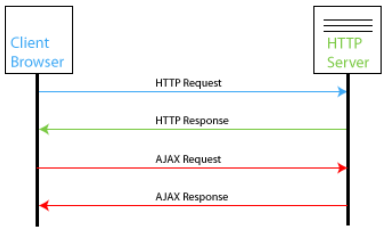
The figure above illustrates how a typical AJAX request/response is made. If it looks a lot like the previous HTTP request and response that's because it is just like the previous HTTP request and response. The difference is not in how the request and response are sent, but in how the browser handles the reception of the response. Think of an AJAX request as a helper for the browser, as it can fetch additional content that the currently displayed page requires without utilizing the entire power of the browser to do so.
The 'X' in AJAX is used to refer to XML as the typical content type that is retrieved via an AJAX request. While it is possible to retrieve XML data (and thanks to the DOM, to parse that data) it is not required to make this work. An AJAX request can really be for any type of data, though it is typically XML or plain text.
*NOTE: in order for AJAX to work correctly, an HTTP server must be utilized. AJAX cannot be used/tested from the local file system.*
Using AJAX
Making an AJAX request from a script is fairly straight forward and highly redundant, which makes it easy to use everywhere once you understand how it works. Modern browsers utilize an XMLHttpRequest object for handling AJAX requests and responses. While this object is available in modern browsers, legacy Internet Explorer (< version 9) has been implementing its own (ActiveX) object for making AJAX requests long before it was available. In both cases, the objects support roughly the same functionality.
Creating the XMLHttpRequest Object
The following code snippet demonstrates the modern way to create the AJAX request object for cross-browser use.
Example 1: creating an XMLHttpRequest object
var xhr = new XMLHttpRequest(); // Global ref for XMLHttpRequest object
The XMLHttpRequest object supports the following methods and properties.
Table 1: XMLHttpRequest methods
| Method | Description |
|---|---|
open(method, url[, async, username, password]) |
opens a connection to a server at the given URL utilizing the specified method |
setRequestHeader(label, value) |
adds a label/value pair to the request header |
send(content) |
used to send content (null for no content) |
getAllResponseHeaders() |
returns all HTTP response headers |
getResponseHeader(label) |
returns the specified HTTP response header |
abort() |
abort the current request |
Table 2: XMLHttpRequest properties
| Property | Description |
|---|---|
onreadystatechange |
references the function to call when the ready state changes |
readyState |
current value of the ready state [0: uninitialized, 1: open, 2: sent, 3: receiving response, 4: response loaded] |
responseText |
plain text response |
responseXML |
XML response content (valid XML only) |
status |
HTTP status code (i.e. 200, 403, 404, etc.) |
statusText |
status text associated with status code |
Sending the Request
Once the XMLHttpRequest object has been created, the process for sending/handling the request is typically the following:
- Open the request (specify method, url, etc.)
- assign ready state change function
- set request headers (if any are required)
- send the request
The following code snippet demonstrates how to send a simple request using XMLHttpRequest.
Example 2: sending an AJAX request
var xhr = new XMLHttpRequest(); // Global ref for XMLHttpRequest object
xhr.addEventListener(‘load’, handleResponse);
// proceed to make/send request
xhr.open(‘GET’, ‘http://www.someurl.com/resource’, true);
xhr.send(null); // null indicates we’re not sending any data
In the above example, the method used is GET, however any of the accepted HTTP request methods may be used (i.e. POST).
Handling the Response
Like any well-behaved HTTP response, the 200 status code indicates that everything was OK. If a status of 200 is not received then there was a problem with the request. In order to properly handle an AJAX request, all that is required is that the status returned is 200 and that the readystate of the XMLHttpRequest object is equal to 4 (which indicates that the response is loaded/complete). The following code snippet demonstrates how this may be accomplished.
Example 3: handling an AJAX response
// Function to handle AJAX response
function handleResponse() {
  if (xhr.status == 200) {
    // alert plain text response
    console.log(xhr.responseText);
    // alert the XML response ... if the content is XML
    console.log (xhr.responseXML);
  }
}
In the above example, if the response was valid XML then DOM methods/properties could be used to parse the response as needed. The plain text response can be parsed as well, but only with available String methods.
AJAX can be used to return entire HTML fragments, which may then be inserted into a document (i.e. via innerHTML); this is another commonly used tactic of AJAX.